

by Linaeya Horn-Muller, on Apr 9, 2026, 6:57:08 AM
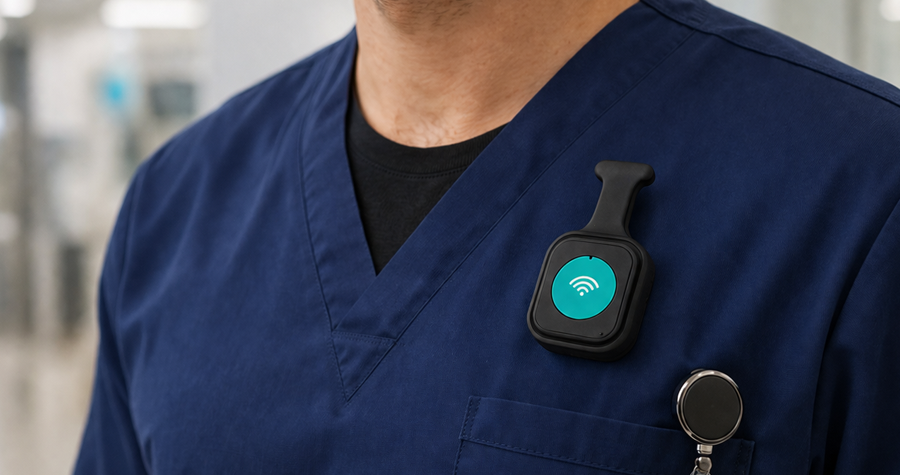
In today’s fast-paced service environments, teams need more than basic alert buttons. They need instant communication, precise location awareness, and the ability to speak in real time during critical situations.
Modern safety platforms bring panic alerts, voice communication, indoor location tracking, and operational messaging together in one scalable system—keeping teams safer, more connected, and more effective.
What Makes a Next-Gen Safety and Communications Platform?
A modern solution blends:
- 🚨 Panic alerting
- 📍 Location technology for room-level accuracy
- 🎙️ Two-way voice communication
- 📱 Mobile app for responders
- 🌐 Cloud portals for administrators
Together, these tools empower teams to alert, talk, coordinate, and resolve situations faster and more reliably than ever.
The Role of Voice in Safety and Operations
Why Voice Matters
Text alerts and silent panic buttons are important, but sometimes hearing and speaking instantly is critical. Voice communication allows teams to:
- Clarify what is happening
- Provide verbal reassurance
- Coordinate multiple responders
- Reduce response times
Voice communication turns a safety platform into a real operational tool, replacing radios, fragmented push-to-talk apps, or personal phones.
Core Solutions Including Voice
1. Two-Way Voice and Panic Button Devices
Best for: Teams that need both daily communication and emergency coordination.
How it works:
- Devices support push-to-talk (PTT) voice calls
- Built-in panic button triggers alerts and opens voice channels
- Works over Wi-Fi, cellular, or both
Pros:
- Unified voice and safety tool
- Reduces need for separate radios
- Group calling for teams or departments
When to use:
- Security teams on casino floors
- Front desk and management in hotels
- Maintenance crews across campuses
2. Push-to-Talk Communication (Radio Mode, No Panic Activation)
Best for: Teams that need fast, reliable communication for day-to-day operations without triggering emergency workflows.
How it works:
- Devices function like radios using push-to-talk (PTT)
- Staff can instantly connect via voice
- No panic alert is triggered, keeping communication operational, not emergency-based
Pros:
- Replaces traditional radios and walkie-talkies
- Instant communication across teams
- Keeps emergency channels separate from routine conversations
- Simple and familiar experience for staff
When to use:
- Housekeeping coordinating room status updates
- Engineering teams managing maintenance requests
- Event staff directing operations in real time
- Any team needing constant communication without emergency escalation
3. Standalone Panic Buttons (Bluetooth, Wi-Fi, Cellular, or LoRa) with Optional Voice Features
Best for: Teams that need emergency coordination.
How it works:
- Panic triggers send alerts to responders
- Optionally pairs with voice devices for direct talkback
- Works over Wi-Fi, cellular, Bluetooth, or long-range LoRa networks
Pros:
- Extended battery life
- Works even where phones are not carried
- Flexible pairing with communication systems
When to use:
- Outdoor staff at golf courses and resorts
- Schools where some staff do not carry phones
Key Benefits of Adding Voice
Faster, Clearer Response
Voice allows responders to understand the situation immediately, not just receive a location pin.
Better Team Coordination
Teams can talk directly during incidents, avoiding back-and-forth texts or guesswork.
Operational Efficiency
A single platform replaces radios, walkie-talkies, separate chat apps, and standalone panic buttons.
Industry Scenarios with Voice
🏨 Hotels and Resorts
Use Cases:
- Housekeeping lead notices a guest conflict and connects with security
- Front desk directs floor staff verbally during a guest emergency
Why Voice Helps:
Quick voice contact supplements location alerts, allowing responders to assess severity in real time.
🏥 Healthcare Facilities
Use Cases:
- Nurse triggers an alert and immediately talks to the response team
- Security verbally coordinates during a medical incident
Why Voice Helps:
High-stress environments benefit from instant verbal communication, especially when details matter.
🎓 Schools and Universities
Use Cases:
- Teacher presses alert and talks directly to campus safety
- Campus operations broadcast important instructions during incidents
Why Voice Helps:
Verbal instructions reduce confusion and improve safety outcomes.
🎰 Casinos and Large Venues
Use Cases:
- Security team triggers a group voice call
- Floor staff get voice guidance during busy shifts
Why Voice Helps:
Fast, distraction-free coordination is critical in dynamic, crowded environments.
⛳ Golf Courses and Outdoor Resorts
Use Cases:
- Grounds crew alerts for help and converses with operations
- Responders coordinate over voice in areas with limited data coverage
Why Voice Helps:
Voice communication bridges the gap where text alerts alone are not enough.
Choosing the Right Solution
Here is a guide to help select between Panic Only and Panic + Voice solutions for different industries:
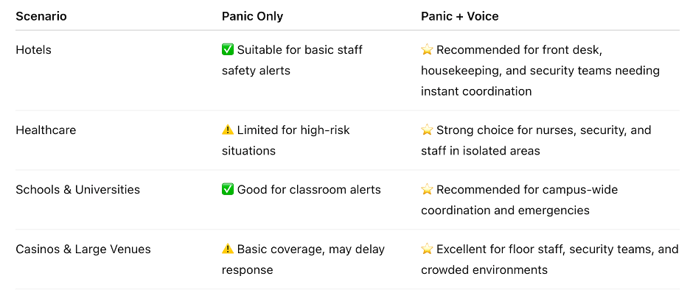

This chart highlights that adding voice enhances safety, communication, and response speed, especially in high-risk, high-traffic, or large-scale environments.
Final Thoughts
Safety is not just about getting help. It is about communicating clearly when every second counts.
Integrating voice into safety platforms transforms them from alert systems into communication engines that support both everyday operations and emergency response.
When teams can talk, alert, locate, and coordinate from a single platform, organizations create safer, smarter, and more resilient environments, whether in hospitality, healthcare, education, or beyond.